 Studio Tank
Your first game with AI: 2 mini games (3D and 2D) with Claude, Godot and three.js
Download ready-made characters, animals and trees, hand them to Claude with a good prompt and play the result right here.
9 min read
You don't need to model, animate or code everything from scratch. In this guide you download ready-made characters, animals and trees from Studio Tank, hand them to Claude with a good prompt and end up with two working mini games: one 3D and one 2D. The two below are real, built with these exact files. Hit Play to try them.
What you need
- A Studio Tank account (free). The free plan gives 5 downloads a month, enough to start; Pro unlocks unlimited downloads, props like the chest and a commercial license to sell your game.
- Claude, ideally Claude Code: it creates the files, runs the project and fixes what breaks. Claude in the browser works too; then you copy the code into your project.
- Godot 4 (free, godotengine.org) or Node.js for three.js. Pick one; the guide has prompts for both.
1. Download the assets in the studio
Open the studio, build (or shuffle) a character and click Download. For the 3D game, pick GLB with the animations the game uses. For 2D, pick Sprites, 1 direction (side), 128 px and 12 fps. Repeat for the fox (Animals), the trees (Nature) and the chest (Props).
3D game: GLB files (30 fps)
hero.glbfox.glboak.glbpine.glbchest.glb
Clips: hero Idle, Run, Jump, Hit and Victory; fox Idle, Walk and Run; trees Wind; chest Open.
2D game: side sprites (12 fps)
hero_Idle.png + .jsonhero_Run.png + .jsonhero_Jump.png + .jsonhero_Hit.png + .jsonhero_Victory.png + .jsonfox_Walk.png + .jsonchest_Open.png + .jsonoak_Wind.png + .jsonpine_Wind.png + .json
Each animation is a PNG sheet with an atlas JSON (the format Phaser, Pixi and TexturePacker read).
2. Set up Claude
Three things make the result much better. None is required, but each is worth the minute it takes.
three.js skill
Skills are instruction packs Claude Code loads when the topic comes up. The
threejs-skills pack (open source, MIT) teaches the right way to load GLB,
play animations, cast shadows and keep the game light. Install it with the command below (or copy the repo's skills/ folder into .claude/skills):
npx skills add cloudai-x/threejs-skillsGodot MCP
With godot-mcp (open source, MIT), Claude Code opens the editor, creates scenes and runs the project to see the errors on its own:
claude mcp add godot -- npx @coding-solo/godot-mcpStudio Tank MCP (optional)
With an API key, Claude can build and download the character for you: "create an explorer with a hat and export a GLB with Idle, Run and Jump". Animals, trees and props come from the studio. See the API and MCP docs.
claude mcp add --transport http studio-tank https://avatar.tankpvp.com/mcp \
  --header "Authorization: Bearer $STUDIO_TANK_KEY"
A CLAUDE.md with the asset facts
Claude reads the CLAUDE.md at the project root in every conversation. Paste this in it and you won't need to repeat
scale, direction and clip names in every request:
# Studio Tank assets (read before touching the models)
- Chibi and voxel characters: ~1.6 m tall, 1 unit = 1 meter, facing +Z.
- They all share the SAME 12-bone skeleton (Root, Hips, Spine, Head, UpperArm_L/R, Hand_L/R,
  UpperLeg_L/R, Foot_L/R) and the same clip names: swapping hero.glb for another character needs no code change.
- Clip names = studio names (Idle, Walk, Run, Jump, Attack, Hit, Death, Victory, Dance...).
  Play once: Jump, Attack, Hit, Death, Victory. The rest loop.
- Material: one small palette texture (one color per zone). Don't replace it; to recolor, download again.
- Animals, trees and props have their own skeleton and clips (check the names inside the file).
- Sprites: one PNG + one JSON (TexturePacker "hash" format) per animation. Side view = facing right.
  meta.fps is the speed and meta.loop says if it repeats. Frames are in order by name.
3. 3D mini game: Coin Hunt
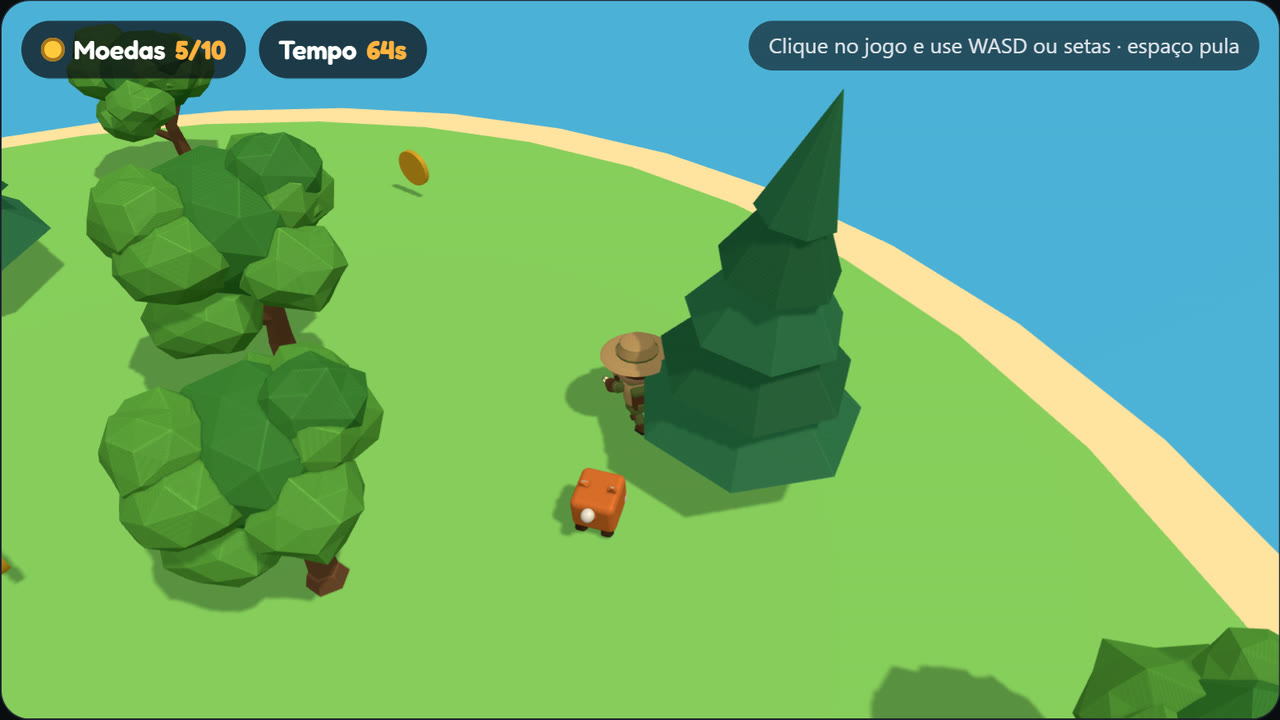
WASD or arrows to move · space to jump · on phones, drag the joystick
Grab the 10 coins before time runs out, dodge the fox and open the chest. This is the prompt for three.js:
Build a 3D browser mini game with three.js and Vite called "Coin Hunt".

Assets (already in public/assets, downloaded from Studio Tank):
- hero.glb: ~1.6 m chibi character facing +Z, clips Idle, Run, Jump, Hit and Victory (30 fps)
- fox.glb: fox, clips Idle, Walk and Run
- oak.glb and pine.glb: trees, clip Wind (sway)
- chest.glb: chest, clip Open
All use 1 unit = 1 meter and a palette texture (don't replace the materials).

The game:
1. A round island (15 m radius) surrounded by water, with 14 scattered trees. Copy the trees with
   SkeletonUtils.clone and play Wind on each one, starting at different times. Put each model inside
   a THREE.Group and position the group (some clips animate the file's root).
2. The player moves with WASD/arrows (plus a touch joystick on phones) and jumps with space. Turn the model
   toward the movement with Math.atan2(x, z). Switch Idle/Run/Jump with a 0.15 s crossFade;
   Jump and Hit play once (LoopOnce + clampWhenFinished).
3. 10 spinning gold coins (a plain three.js cylinder). With all of them, the chest appears; touching it
   plays Open and the player celebrates with Victory.
4. The fox wanders (Walk) and chases the player (Run) within 7 m. On contact the player plays Hit,
   gets pushed back and loses a coin, which respawns on the island.
5. 70 seconds to win. HTML HUD with coins and time, and an end screen with "Play again".
6. Third-person camera from above and behind, following smoothly. Shadows on.

Work in steps: first the scene with the character walking, then coins, fox and game over.
Run it with npm run dev and tell me what to test at each step.
And the same game in Godot 4:
Build a 3D mini game in Godot 4 (GDScript) called "Coin Hunt".

Assets in res://assets (Studio Tank GLB, 1 unit = 1 m, the model faces +Z):
- hero.glb: Idle, Run, Jump, Hit, Victory
- fox.glb: Idle, Walk, Run
- oak.glb and pine.glb: Wind
- chest.glb: Open

1. On import, enable Loop on Idle, Run, Walk and Wind (Advanced Import Settings > Animation).
2. Main scene: round island (green CSGCylinder3D, radius 15) over a water plane, DirectionalLight3D
   with shadows and a WorldEnvironment with a light sky. 14 scattered trees playing Wind.
3. Player: CharacterBody3D with a capsule and hero.glb as a child. WASD/arrows move (camera relative),
   space jumps. Use the GLB's AnimationPlayer: play("Run"), play("Idle"), with a 0.15 s blend.
   The model faces +Z: rotate with atan2(direction.x, direction.z).
4. 10 spinning coins (Area3D with a gold cylinder). With all of them, the chest appears; reaching it plays
   Open and the player plays Victory.
5. The fox (CharacterBody3D) wanders with Walk and chases the player with Run within 7 m. On contact the
   player plays Hit, gets pushed back and loses a coin.
6. 70 s timer, HUD with Labels (coins and time) and a win/lose screen with a "Play again" button.

Create the .tscn and .gd files and tell me where to connect each signal. If the Godot MCP is on, build the
scenes through it and run the project to check.
Tips for the 3D assets
- Several copies of the same animated model (the trees): in three.js use
SkeletonUtils.clone; a plainclone()shares the skeleton and all copies move together. - Position a group, not the model: put each GLB inside a
Group(orNode3D) and move the group. Some clips animate the file's root (the chest opening) and, without the group, the model jumps to the origin. - Facing: the model faces +Z. To turn toward the movement:
rotation.y = atan2(x, z). - Smooth switches: change clips with
crossFadeTo(three.js) or theAnimationPlayerblend (Godot), 0.1 to 0.2 s. - Godot: imported GLB clips don't loop by default. Enable Loop on walk, run and idle at import.
- Right scale from the start: 1 unit = 1 meter. If the character looks small, move the camera closer instead of scaling the model.
4. 2D mini game: Fox Hop
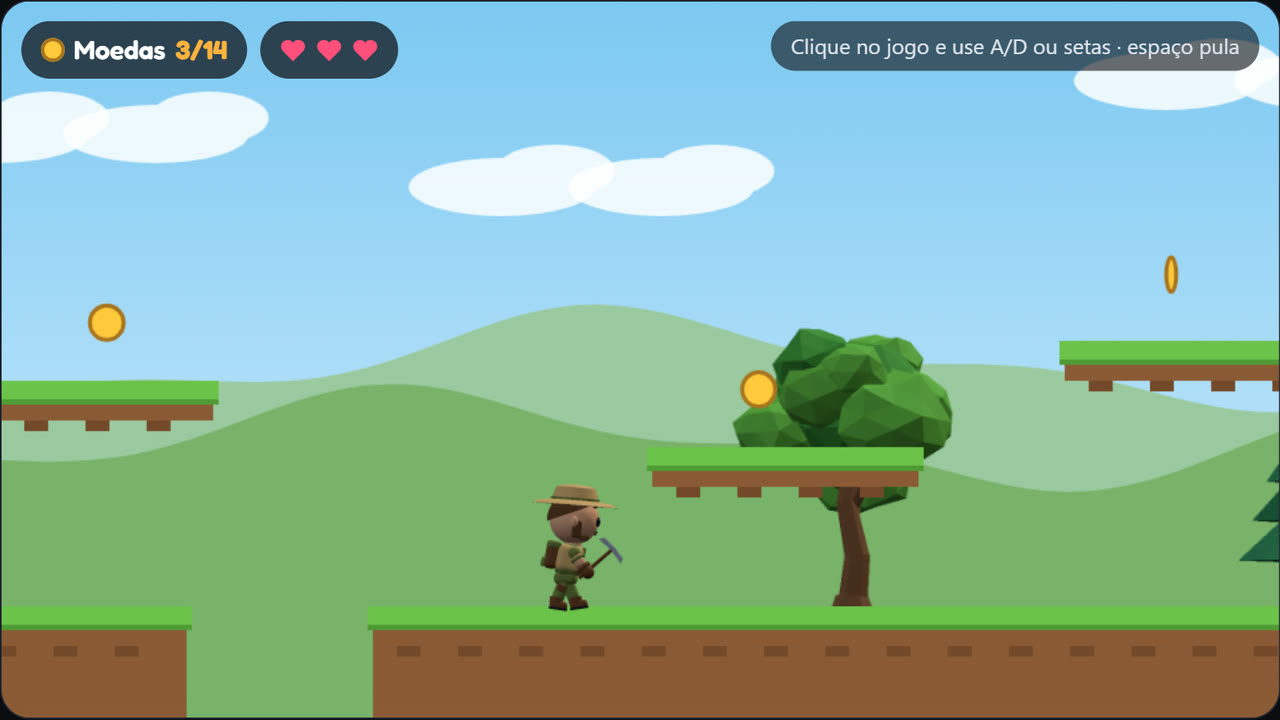
A/D or arrows to run · space to jump · stomp the foxes
Run to the chest at the end of the level, grab the coins and stomp the foxes (from the side they hurt). In Godot 4:
Build a 2D platformer in Godot 4 (GDScript) called "Fox Hop".

Sprites in res://sprites (Studio Tank: side view facing right, 128 px frames, 12 fps).
Each animation is a PNG + a JSON in "hash" format (frames[name].frame = x, y, w, h; meta.fps; meta.loop):
- hero_Idle, hero_Run, hero_Jump, hero_Hit, hero_Victory
- fox_Walk, chest_Open
- oak_Wind and pine_Wind (trees, 256 px frames, 8 fps)

1. Write a @tool script that reads each JSON and builds a SpriteFrames (.tres) with one animation per
   file: frames sorted by name, speed = meta.fps, loop = meta.loop.
2. Player: CharacterBody2D + AnimatedSprite2D. Arrows/A-D run (300 px/s), space jumps, with 0.1 s
   coyote time. Use flip_h when moving left. The feet don't touch the frame's bottom edge: offset the
   sprite so the feet sit on the ground.
3. A ~4,000 px level: ground with gaps and platforms (TileMapLayer or StaticBody2D), animated trees in
   the background and a Parallax2D with hills.
4. Coins (Area2D) to collect. Foxes patrol: jumping on top removes them; touching from the side costs one
   of 3 lives (the player plays hero_Hit). Falling into a gap also costs a life.
5. At the end of the level, the chest: touching it plays chest_Open, the player plays hero_Victory and the
   win screen shows the coins collected.
Camera2D following the player, clamped to the level bounds.
Rather run it in the browser with nothing to install? The same game in canvas:
Build the same 2D platformer ("Fox Hop") in the browser, in a single HTML file with canvas and plain
JavaScript, no library. The sprites are in ./sprites (same names and format as the list above).

- Load each JSON with fetch and the image from meta.image; sort the frames by name.
- Current frame = floor(time * meta.fps) (looping) or the last frame (not looping).
- Draw with drawImage; to face left, use scale(-1, 1).
- Find each sheet's foot line (last row with an opaque pixel in the first frame) and use it to put
  the characters on the ground.
- Same rules: run, jump with coyote time, coins, foxes (stomp to remove, side contact hurts),
  3 lives, gaps and the chest at the end. A 960x540 canvas that scales to the screen width.
Tips for sprites
- Frames come in order by name (
Run_side_000,Run_side_001...). Sorting by name is enough. - Feet on the ground: the drawing doesn't touch the frame's bottom edge. Measure the last row with a pixel once and use it as the offset.
- Side view faces right. For left, mirror it (
flip_hin Godot,scale(-1, 1)in canvas). - Top-down or isometric? Download 4 or 8 directions: each row of the sheet is one direction, in the JSON's order.
- Crisp pixel art: 64 px sprites with "nearest" filtering (Godot: Texture Filter Nearest) give a retro look.
5. How to write a prompt that works
- State the game in one sentence before the rules. "A side platformer where you run to a chest" steers everything after it.
- List the files with their clips. Claude doesn't open the GLB to guess; with the names it writes the right code the first time.
- Give numbers: speed, jump height, time, number of coins. Easy to tweak later ("jump 20% higher").
- Ask in steps and test each one. A whole game at once breaks in more places and is harder to fix.
- Show the error: paste the console message or a screenshot. "The fox walks backwards" gets fixed faster than "it doesn't work".
6. From mini game to your own game
Every Studio Tank chibi and voxel character uses the same skeleton and the same animation names. So the most fun step is free:
shuffle another character in the studio, download it and swap the file. Pirate, robot or zombie, the code stays the same. Then
ask Claude for one new thing at a time: an enemy that shoots (clip Shoot), a house to walk into, a bigger map made
with the studio's World.
Start with the character
Build or shuffle your hero in the studio and download it as GLB or sprites. Free to start.